

For modern gamers, performance is not just about the console or PC; the right accessories can significantly improve comfort, responsiveness, and immersion. From expanding device connectivity to ensuring uninterrupted power, gaming peripherals play a critical role in elevating the experience.
This article highlights ten practical gaming tech essentials designed to address common pain points like limited device interfaces, battery shortages, hand fatigue, and long gaming sessions. Each product includes actionable recommendations, usage scenarios, and technical considerations to help players make informed decisions.
Multiport Type-C Charger — Power and Connectivity in One
A multiport type-C charger allows gamers to charge multiple devices simultaneously, such as consoles, smartphones, and wireless controllers. It is ideal for setups where multiple gadgets need charging at once, especially during long gaming sessions.
Many players struggle with limited wall outlets or managing multiple charging cables. A multiport charger addresses this by centralizing power distribution and reducing clutter.
Buying Tips:
- Output per port: Ensure each port provides adequate wattage for fast charging.
- Total power: Look for chargers with 65W+ combined output for multi-device efficiency.
- Port types: Include USB-C PD ports and USB-A ports for versatile compatibility.
High-Speed USB-C Cable — Reliable and Fast Data Transfer
A high-speed USB-C cable ensures quick charging and data transfer between consoles, PCs, and external storage.
Gamers often experience lag or slower file transfers with standard cables. Investing in a certified high-speed USB-C cable provides stable connections, reduces interference, and supports higher power delivery for fast charging.
Buying Tips:
- Power delivery: Ensure support for at least 60W–100W for devices like handheld consoles.
- Data transfer speed: Choose cables supporting USB 3.1/3.2 or higher for fast file transfers.
- Durability: Look for reinforced or braided cables to withstand frequent use and travel.
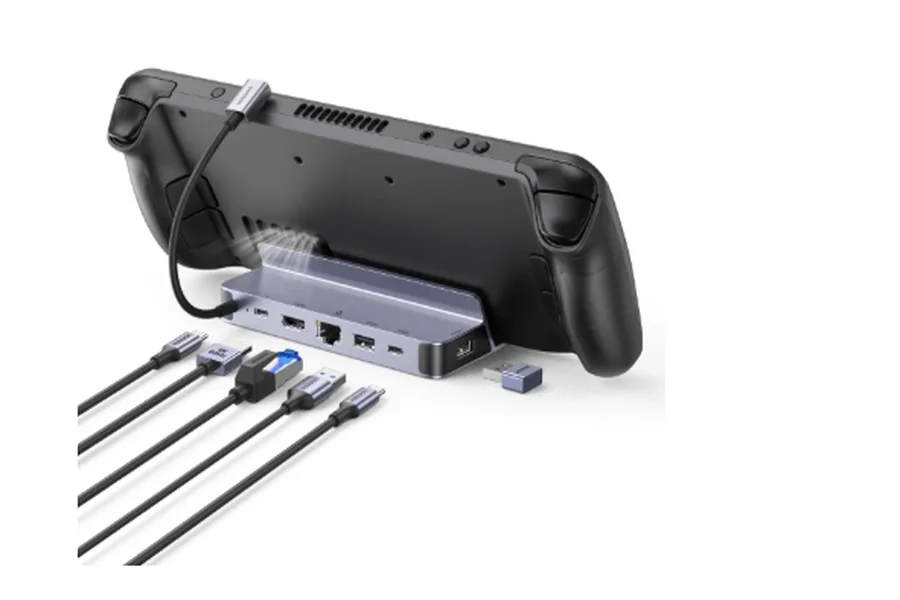
Steam Deck Docking Station — Transform Your Handheld into a Full Console Experience
A steam deck docking station allows handheld consoles to function like a home console, connecting seamlessly to TVs, monitors, and peripherals. This is ideal for players who want large-screen gaming without sacrificing the portability of a handheld device.
Many handheld gamers find that the device’s limited ports restrict their setup—connecting multiple peripherals simultaneously or playing on a large display can be frustrating without a dock. A docking station solves these issues while enabling charging during gameplay.
Buying Tips:
- Video output: Look for 4K/60Hz support or 2K/120Hz if playing high-frame-rate games.
- Power delivery: Docking stations should provide at least 65W to avoid drops in performance during intensive gaming.
- Form factor: Compact designs are portable, whereas larger docks accommodate more peripherals and offer extra stability.
Comparison Table:
| Type | Best For | Pros | Cons |
| Compact dock | Travel and minimal setups | Portable, light | Limited ports |
| Full-feature dock | Home or multi-device setups | Multiple ports, high-res output | Larger, less portable |
Magnetic Wireless Power Bank — Power on the Go
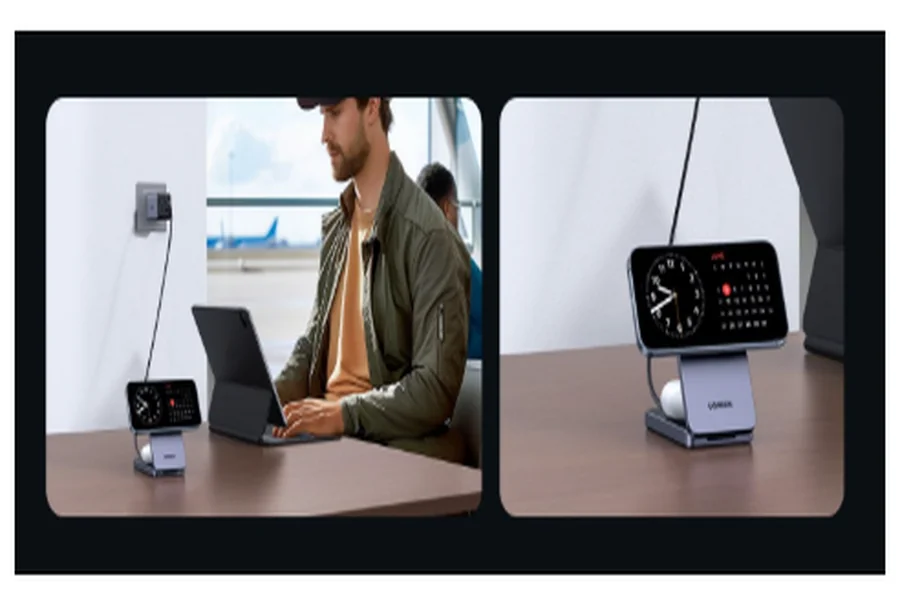
Long gaming sessions or travel can drain handheld consoles and smartphones quickly. A magnetic wireless power bank ensures devices remain charged without cumbersome cables. The magnetic attachment allows gamers to charge while maintaining a natural grip, keeping gameplay uninterrupted.
For many players, wired charging can interfere with hand movement and comfort. Wireless magnetic charging solves this problem while offering portability and multi-device support.
Buying Tips:
- Capacity: 5000mAh is sufficient for short trips, 10000mAh+ for extended sessions.
- Charging speed: 15W wireless fast charging or 20W+ wired fast charging.
- Compatibility: Look for multi-device support.
Comparison Table:
| Type | Advantages | Drawbacks | Ideal For |
| Wired portable charger | Faster charging | Cables may obstruct gameplay | Hardcore gamers needing speed |
| Magnetic wireless bank | Cable-free, convenient handling | Slightly slower charging | Mobile gaming or casual play |
High Refresh Rate Gaming Monitor — Smooth and Responsive Gameplay
Competitive gaming genres like FPS or MOBA benefit from monitors with high refresh rates, as smoother visuals improve reaction time.
Many players struggle with ghosting and motion blur on 60Hz displays, which can negatively impact aiming and control. Investing in a high-refresh-rate monitor addresses this while enhancing overall visual quality.
Selection Tips:
- Refresh rate: Minimum 144Hz; 240Hz for high-end competitive gaming.
- Resolution: 2K balances performance and visual quality; 4K offers stunning graphics but requires a powerful GPU.
- Panel Type: IPS panels for better colors, TN for faster response times.
User Recommendation:
- Casual/streaming players: 2K at 144Hz.
- Competitive esports players: 1080p at 240Hz.
Mechanical Keyboard — Precise Tactile Feedback
Long gaming or typing sessions benefit from a mechanical keyboard that enhances control and reduces fatigue.
Players often find that thin membrane keyboards feel mushy and produce delayed keystrokes. A mechanical keyboard provides consistent feedback and reliable responsiveness.
Selection Tips:
- Switch type: Red for speed, brown for balance, blue for tactile feedback.
- Layout: 87 keys for compact setups, 104 keys for full functionality.
- Lighting: RGB backlighting for visibility and aesthetics.
Gaming Mouse — Accurate Precision in Every Click
A dedicated gaming mouse allows precise control in FPS games or high-click-rate MOBA titles.
Gamers using standard mice may experience low DPI or high latency, making it difficult to aim accurately or perform rapid actions. A high-DPI gaming mouse solves these issues while providing ergonomic support.
Selection Tips:
- DPI Range: Minimum 16000 DPI with adjustable steps.
- Connectivity: Wired for low latency, 2.4GHz wireless for flexibility.
- Ergonomics: Ensure comfort to prevent wrist strain during long sessions.
Noise-Cancelling Headphones — Immersion and Communication
Noise-cancelling headphones help maintain focus and improve communication during intense gaming sessions, particularly in noisy environments.
Players often struggle with ambient noise affecting in-game audio or team chat. ANC headphones with ambient sound modes resolve this, creating a more immersive and controlled environment.
Selection Tips:
- Active noise-cancellation (ANC) and ambient modes.
- Low-latency modes to prevent audio lag.
- Clear microphone with anti-noise capabilities.
External Game Controller — Versatile Input for Multiple Platforms
Controllers enhance gameplay on handheld consoles, mobile devices, and PCs.
Touchscreen controls are imprecise for action games, and keyboard layouts may not suit certain genres. Controllers provide a more intuitive experience.
Selection Tips:
- Connection: Bluetooth or 2.4GHz wireless; wired for consistent performance.
- Features: Dual joysticks, haptic feedback, programmable buttons.
- Compatibility: Multi-platform support is preferable.
Gaming Cooling Pad — Keep Devices Cool During Extended Play
Extended gameplay can generate excessive heat, leading to throttling and reduced performance.
Players often experience performance drops or thermal warnings without proper cooling. A dedicated cooling pad ensures stable performance and protects hardware.
Selection Tips:
- Fan count and speed: Adjustable for optimal cooling.
- Noise level: Quiet operation is preferable.
- Extra ports: USB expansion can be a useful bonus.
External SSD — Faster Load Times and Expanded Storage
Large AAA games require fast load times and sufficient storage.
Gamers with limited console storage or mechanical hard drives experience long loading screens. High-speed external SSDs reduce wait times and allow more games to be stored.
Selection Tips:
- Capacity: 1TB minimum; 2TB+ for extensive game libraries.
- Interface: USB-C or Thunderbolt for speed.
- Read/Write Speed: 1000MB/s+ for smooth performance.
Gaming Chair — Comfort and Ergonomics for Long Sessions
Ergonomic chairs reduce fatigue and maintain posture during marathon gaming sessions.
Players sitting on standard chairs often develop back or shoulder pain. Gaming chairs with adjustable lumbar and head support alleviate these issues.
Selection Tips:
- Adjustability: Recline, armrest height, seat depth, headrest, lumbar support.
- Material: Breathable mesh or durable leather.
- Comfort: Long-term use without discomfort.
FAQ
Q1: Is a high-end Steam Deck Docking Station necessary?
A1: If only HDMI and controller support is required, entry-level docks are sufficient. High-end models are worth considering for 4K output and multiple peripheral connections.
Q2: Wired vs. magnetic wireless power bank — which is better?
A2: Wired chargers offer faster charging but may obstruct gameplay. Magnetic wireless banks are more convenient for mobile gaming and casual play.
Q3: Do gaming cooling pads improve FPS significantly?
A3: Cooling pads prevent thermal throttling and maintain consistent performance rather than directly boosting hardware power.
Conclusion
The right gaming accessories can greatly enhance gameplay by solving real-world problems. From a steam deck docking station that expands connectivity to a magnetic wireless power bank that ensures uninterrupted play, each tool addresses specific pain points. Considering your gaming scenarios, device requirements, and ergonomic needs will ensure both an enjoyable and sustainable gaming experience.
